
Hide line items from the customer
Keep a cost in the total without listing it on the quote.
Sometimes a cost belongs in the price but not on the page: disposal fees, consumables, or a surcharge you would rather fold into the job. Hiding keeps the money in the total and leaves the line off everything the customer sees.
Hide a line
- Open the line's ⋯ menu on the quote.
- Choose Hide from customer.
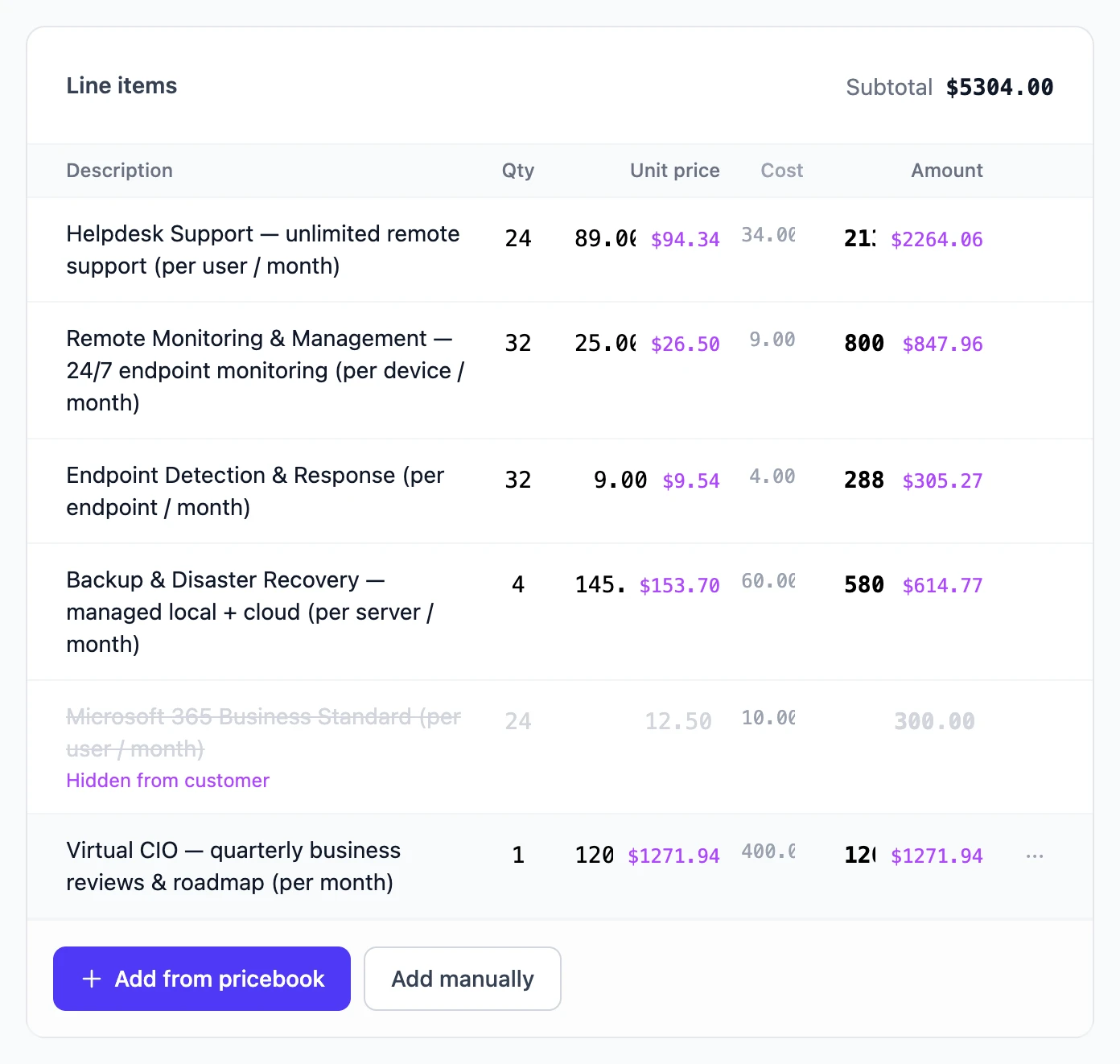
The line stays on your screen, struck through and labelled Hidden from customer. Choose Show to customer from the same menu to bring it back. Adjustments have the same option on their eye button.
Where the money goes
The total never changes. On the customer's copy, the web page and the PDF:
- A hidden sub-item's amount is spread across the visible lines beside it.
- A hidden line's amount, including its sub-items, is spread across the other visible lines, in proportion to each one's price.
- A hidden adjustment is spread across every visible line in proportion to its price.
While you build, the purple figure beside a price is what the customer will see once hidden amounts are folded in. Check the result with Preview.
A quote must keep at least one visible line: there has to be somewhere for hidden amounts to go.
Still stuck? Open a support ticket and we will reply by email.