
Discounts, taxes and fees
Add a percentage or flat amount on top of, or off, the subtotal.
Adjustments change a quote's total after the line items: a discount, sales tax, a trip charge or a card fee.
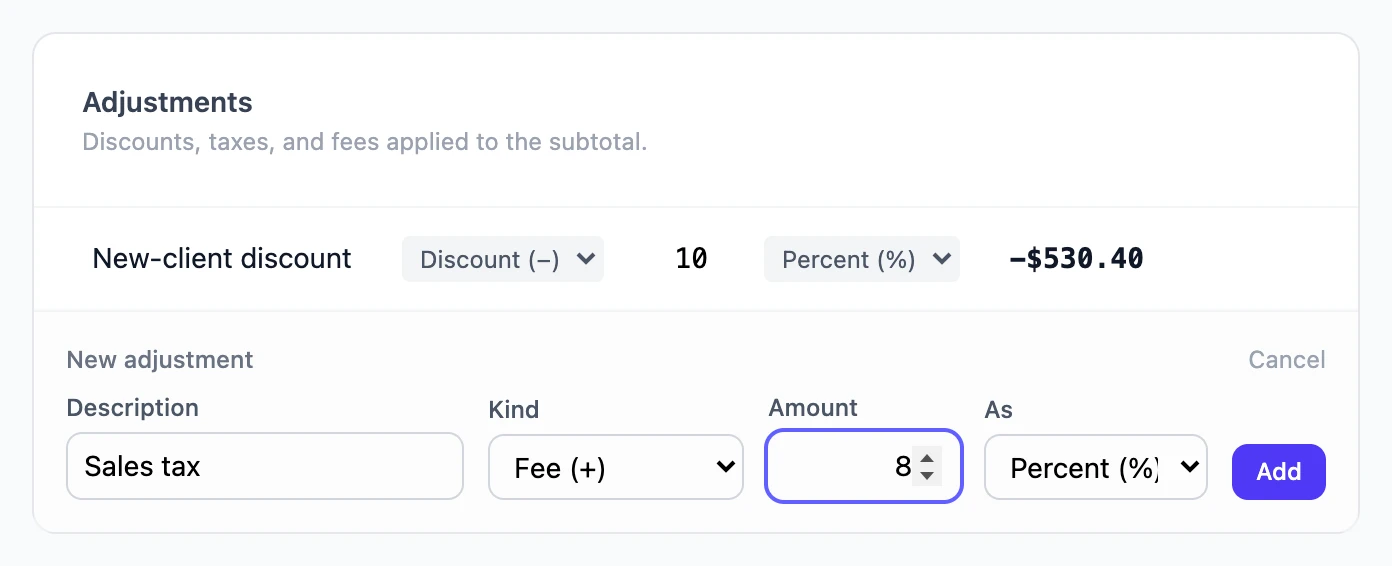
Add an adjustment
- Under Adjustments on the quote, choose Add adjustment.
- Enter a Description the customer will see, like "Sales tax" or "Spring discount".
- Choose the Kind: Fee (+) adds to the total, Discount (−) takes away from it.
- Enter the Amount and choose whether it is Flat ($) or Percent (%). Percentages are whole numbers.
- Choose Add.
The effect in money shows beside each adjustment, and Totals updates straight away. Change any part of an adjustment in place, or choose Remove.
How percentages are worked out
Every percentage is a percentage of the subtotal, the sum of the line items, not of the running total. A 10% discount and 8% tax on a 1,000.00 subtotal are −100.00 and +80.00, whatever order they are in.
If your tax must be charged on the discounted price, enter the discount as a flat amount and work out the tax on the reduced figure yourself, or check the result against your tax rules before sending.
Hidden adjustments
The eye button on an adjustment hides it from the customer. The total does not change: the adjustment's amount is spread across the visible lines instead of being listed. See Hide line items from the customer.
Still stuck? Open a support ticket and we will reply by email.